madExcept: How a Twenty-Year-Old Delphi Application Still Gets Fixed in a Day
Bjørn T. Nøstdahl
~9 min read
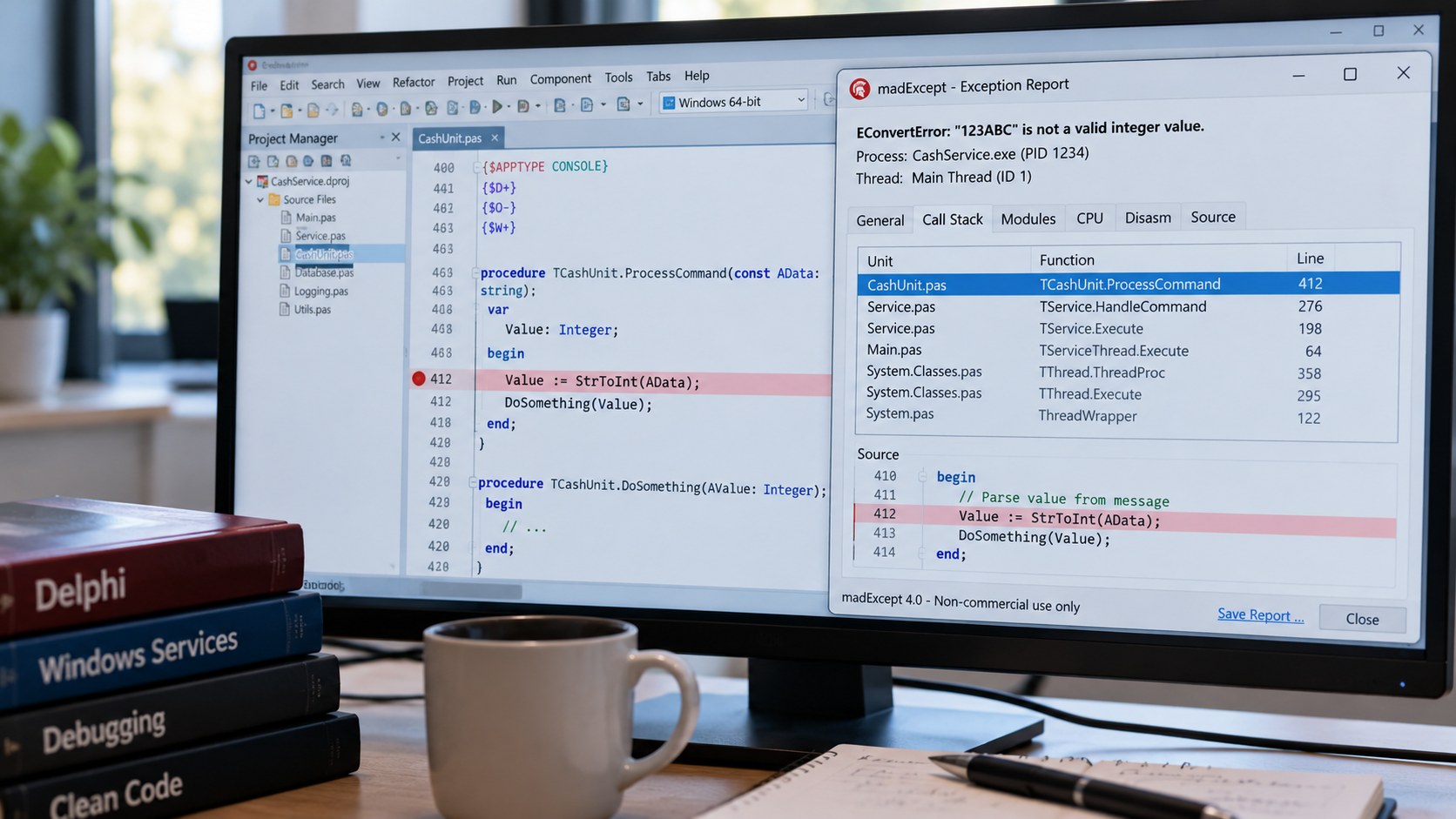
There is a Delphi application in cash automation that I still help keep alive. It was written in the early 2000s, it runs on Windows machines in places I will never visit, and it is used by service engineers who are not programmers. When it fails, I usually know why within an hour of the failure, often before anyone has called me. That is not because the code is unusually good. It is because of madExcept, and this article is about how I use it.
What madExcept does
madExcept is an exception handler for Delphi, made by madshi. You enable it per project from the IDE and it hooks into the application. From then on, any exception that nobody catches is intercepted before the default dialog appears, and instead of "Access violation at address 0040A2F1" the user sees a friendly box, and I get a bug report. The report contains:
- The exception class and message, and the address it happened at.
- A full call stack for the thread that failed, with module, unit, line number and routine for every frame.
- The call stacks of every other thread in the process at that moment.
- The list of loaded modules with their versions, the operating system version, CPU, memory, and the version of the executable itself.
- Optionally a screenshot, and any custom data I choose to add.
The user can send the report by email or over HTTP with one click, or it is sent automatically. For a tool that runs unattended on a service engineer's laptop, automatic is the right setting. A copy is always saved as a text file next to the application's data, which is what I ask for when the network path did not work.
It is a commercial product, free for non-commercial use, and the price is in the range of a few hours of debugging. It paid for itself the first week.
Setting it up
Enable it under the madExcept settings in the project menu. Most of the defaults are sensible; the ones I always change are these.
Automatic bug reporting. Send the report without asking, to an address that lands in a mailbox we monitor. The user still sees a short message that something went wrong and that it has been reported.
Save the bug report to a file. Always. The mail server will be down the day it matters.
Catch exceptions in all threads. On by default, but check it. A service tool that talks to a serial port and a network at the same time has several threads, and the failure is rarely in the main one.
Freeze detection. madExcept can notice when the main thread has stopped processing messages for a number of seconds and produce a report with the stacks of every thread. Most "the program hangs" tickets I have ever had were solved by this setting alone, because a frozen program does not raise an exception, and before madExcept all I had was a description from someone standing in front of a grey window.
Version info. madExcept reads the version resource of the executable and puts it in the report. That only helps if the version number changes with every build, so set it in the project options and let the build process bump it. A bug report that says version 1.0.0.0 is a bug report with no version.
Where the line numbers come from
A stack trace with addresses is almost useless. What makes madExcept worth the money is that every frame carries a unit name, a line number and a routine, like this:
main thread ($1a2c):
00527f31 +0d5 ServiceTool.exe CommPort      412  +3 TCommPort.ReadFrame
0052a0b8 +120 ServiceTool.exe Transactions  188 +11 TDeposit.Process
0052b3e4 +044 ServiceTool.exe MainForm      731  +2 TfrmMain.tmrPollTimer
004f8a21 +035 ServiceTool.exe Vcl.ExtCtrls 2270  +1 TTimer.Timer
Those line numbers come from the map file the linker writes. madExcept reads the map file after linking, compresses the line information and stores it inside the executable, so you never ship a map file and never have to match a report against the right one. The step is done by the IDE plugin on every build, and there is a command-line tool for build servers that compiles without the IDE. If you forget that step on the build server, you get reports with addresses and no line numbers, which is how I learned to make it part of the build script instead of something a person remembers.
The accuracy of a trace also depends on how the code was compiled, which brings us to directives.
Compiler directives that matter
Delphi has two ways to set compiler options: the project options, which apply to everything, and directives in the source, which apply from that point on in that unit. For a codebase this old, with units shared between several projects and two compilers, I keep a single include file that every unit pulls in, so the decisions are made in one place.
{$IFNDEF FPC}
  {$IFDEF DEBUG}
    {$D+}  // debug information
    {$L+}  // local symbols
    {$O-}  // optimisation off, so the stack trace matches the source
    {$W+}  // stack frames on, so every call shows up in the trace
    {$R+}  // range checking
    {$Q+}  // overflow checking
    {$C+}  // assertions
  {$ELSE}
    {$D+}  // keep line info even in release: madExcept needs it
    {$L-}
    {$O+}
    {$W-}
    {$R-}
    {$Q-}
    {$C-}
  {$ENDIF}
  {$DEFINE USE_MADEXCEPT}
{$ENDIF}
A few notes on why each line is there.
{$D+} stays on in release builds. It costs nothing at runtime, it only makes the map file complete, and without it madExcept has no line numbers to compress. The release build is the one running on the customer's machine, which is the one you want traces from.
{$O-} and {$W+} in debug builds make traces exact: with optimisation on, the compiler inlines and reorders, and a frame can disappear or point at the line after the one that failed. In release I accept slightly fuzzier traces in exchange for speed, but for a tool that waits on a serial port most of the time, I have more than once shipped a release build with {$O-} and nobody noticed.
{$R+} and {$Q+} turn silent corruption into exceptions. An index one past the end of a fixed array is exactly the kind of bug that has lived in a protocol handler for fifteen years, and range checking turns it from "sometimes the balance is wrong" into a report with a line number. I leave them on in release builds for the units that parse data from the outside world, by switching them on at the top of those units and off at the bottom.
{$IFNDEF FPC} wraps the whole block because the same units compile under Free Pascal for a Linux build, and madExcept is Windows and Delphi only. The USE_MADEXCEPT define is my own, and every direct call into madExcept is wrapped in it:
procedure ReportCaughtException(E: Exception; const Context: string);
begin
  Log.Error(Context + ': ' + E.ClassName + ' ' + E.Message);
  {$IFDEF USE_MADEXCEPT}
  madExcept.HandleException(etNormal, E, nil, False, 0, nil, nil, Context);
  {$ENDIF}
end;
That routine is what goes in the except blocks that must not let an exception escape, such as a timer handler or a thread loop. The exception is handled, the program keeps running, and I still get a full report with the stack. Without the directive the Free Pascal build simply logs the message, which is the best it can do.
Two more directives from the same include file deserve a mention. {$WARN UNIT_PLATFORM OFF} around code that uses Windows-only units, with the routines marked platform, keeps the warning count at zero without hiding real warnings, and a zero warning count is what lets you treat warnings as errors on the build server. And the Delphi version checks, {$IF CompilerVersion >= 23} and friends, are how one source tree builds under three Delphi releases, because a service tool outlives several IDEs.
Adding your own data to a report
The exception and the stack tell you where. The custom data tells you why. madExcept lets you register a handler that runs before the report is assembled, and whatever you add there goes into the report:
{$IFDEF USE_MADEXCEPT}
procedure AddContext(const exceptIntf: IMEException; var handled: Boolean);
begin
  exceptIntf.BugReportSections['Device'] := Comm.DeviceDescription;
  exceptIntf.BugReportSections['Last frames'] := Comm.LastFramesAsText(10);
  exceptIntf.BugReportSections['Config'] := Settings.AsText;
end;

initialization
  RegisterExceptionHandler(AddContext, stDontSync);
{$ENDIF}
The last ten frames from the serial port, the device model, and the configuration file. With those three sections, most reports from the field can be reproduced on my desk without a phone call. The habit is to ask, every time a report needed a follow-up question, whether the answer could have been in the report, and then to add it.
Thread names are the other small thing with a large effect. madExcept shows every thread's stack, and a stack labelled "ReadFrame" is far easier to read than one labelled by a hexadecimal id. Name threads when you create them; madExcept has a call for it and newer Delphi versions have one on TThread.
What about Lazarus?
madExcept is Delphi only. For the Free Pascal build the equivalent is to compile with line information, -gl, and the lineinfo unit, which makes DumpExceptionBackTrace print a stack with units and line numbers, and heaptrc for leaks. It is not the same experience, there is no report mailed home and no freeze detection, but it covers the unit test runs and the Linux service, and the USE_MADEXCEPT define keeps both builds honest about which one has what.
What it changed
Before madExcept, a failure in the field was a phone call, a guess, and a build with extra logging sent out in the hope that it would fail again. After it, a failure is an email with the exact line, the state of the device, and the configuration, usually before the user has finished describing it. For a twenty-year-old codebase with no test suite worth the name, that is the difference between an application you can keep alive and one you have to replace.
Questions for you
- Do you ship debug information in release builds, or are you still afraid of the file size? What is in your map file that you would not want a customer to see?
- Which custom sections have you added to bug reports, and which one turned out to matter most?
- Free Pascal users: have you found anything that comes close to automatic bug reporting with full stacks?
Email me at bjorn.nostdahl@nostdahl.com, ideally with a bug report attached.